 Michael
Knowing how to keep track of inventory is one of those skills that every product business needs but few owners are ever taught. You buy stock, you sell stock, and somewhere in between the numbers drift. A box gets moved, a return never gets logged, or a supplier ships five fewer units than the invoice says. Before long, the count in your notebook or spreadsheet no longer matches what is sitting on the shelf.
The good news is that accurate stock records do not depend on expensive equipment or a large team. They depend on a few simple habits, applied the same way every day. This guide walks through 7 practical steps that actually work for a market stall, a busy online shop, or a business with several storerooms. If you have ever wondered how to track inventory without hiring extra staff, these steps are the place to start. Along the way, we compare the main methods and help you decide which one suits your size and budget.
Why an Accurate Count Matters More Than You Think
Every buying decision you make depends on a number. When that number is wrong, the mistake spreads. If your records show twenty units but the shelf holds only five, you will promise orders you cannot fill. If your records show five but the shelf holds twenty, you will reorder stock you do not need and tie up cash that could pay wages or rent.
Owners often ask how to track inventory without slowing the business down. The answer is to make recording part of the normal flow of work, such as logging a delivery while you unpack it, rather than a separate job saved for later. When recording happens at the same moment as the physical task, it takes seconds instead of hours, and nothing gets forgotten.
Poor records also hide problems. Theft, damage and supplier short-shipments are much harder to spot when nobody is sure what the true figure should be. Once your counts are reliable, these gaps stand out quickly, and you can act before small losses become large ones.
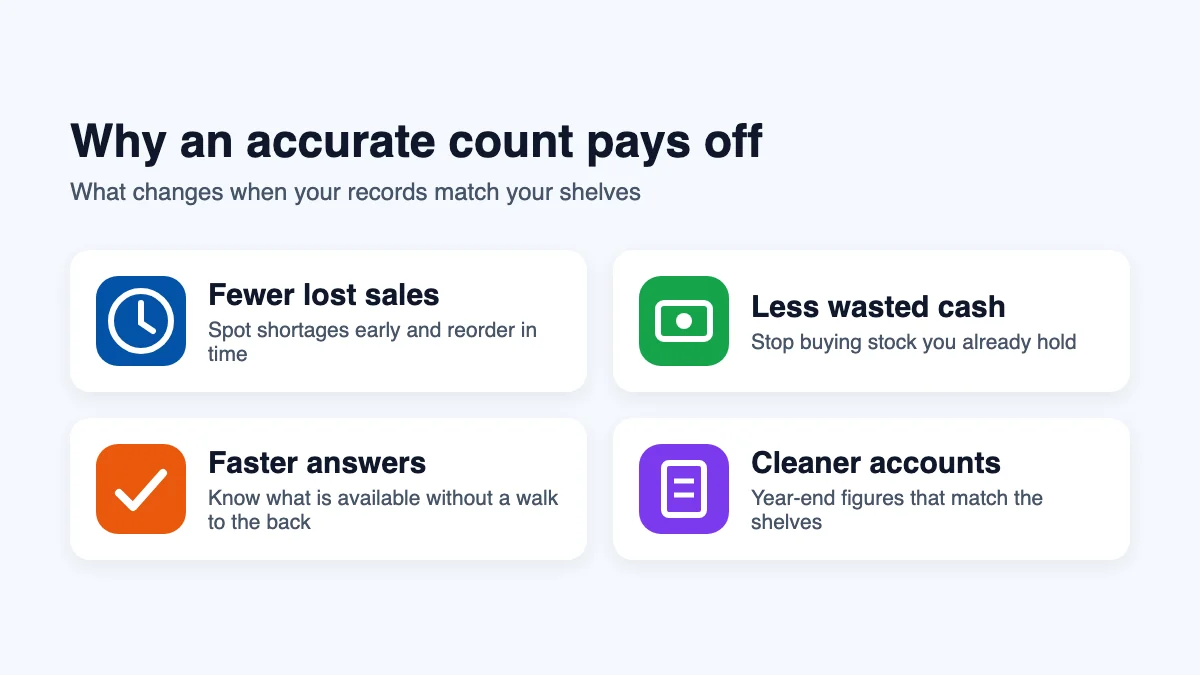
- Fewer lost sales: you see shortages early and reorder in time.
- Less wasted cash: you stop buying items you already have.
- Faster answers: staff can tell customers what is available without walking to the back room.
- Cleaner accounts: your year-end figures match reality, which makes tax time far less stressful.
How to Keep Track of Inventory in 7 Simple Steps
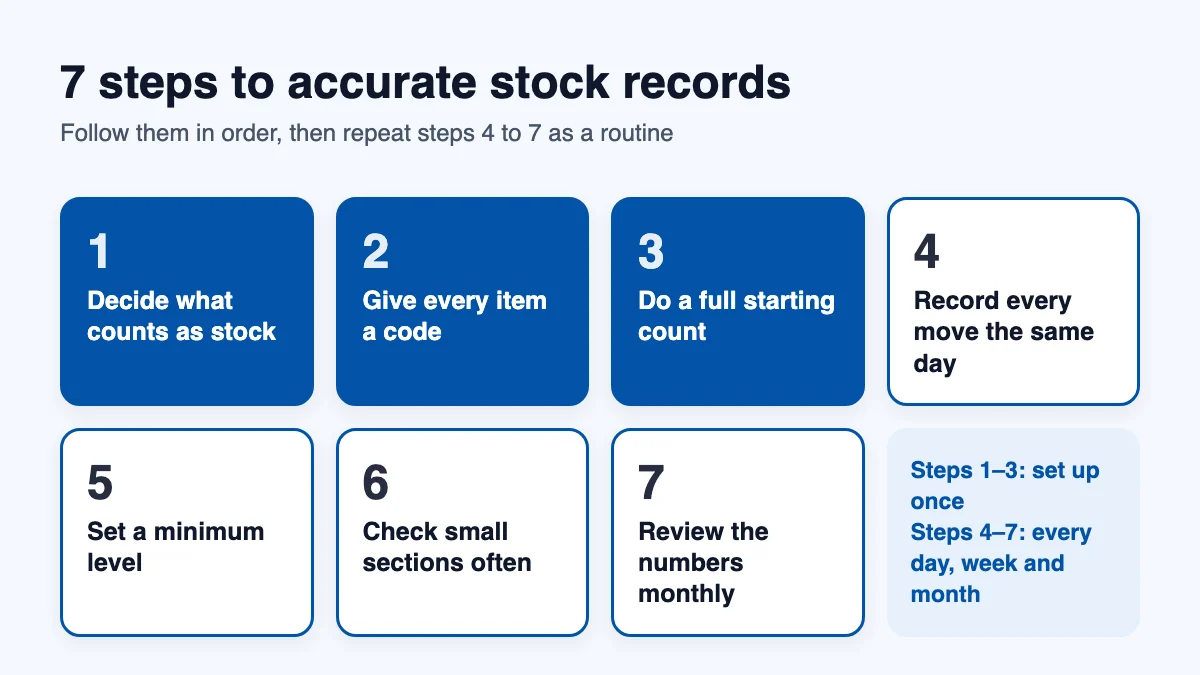
If you are still working out how to keep track of inventory in your own business, treat the steps below as a checklist. They build on each other, so it helps to follow them in order. Most small businesses can set up the first four in a single weekend, and the last three become routine within a month.
Step 1: Decide What Counts as Stock
Start by listing everything you hold for sale, plus the materials you use to make or ship products. Packaging, labels and spare parts are easy to forget, yet running out of boxes can stop orders just as surely as running out of products. Leave out office supplies and equipment you use to run the business; those belong in a separate list.
Step 2: Give Every Item a Unique Code
Each product, and each variation of it, needs its own short code, often called a stock keeping unit (SKU). A blue T-shirt in size medium is a different item from the same shirt in size large, so it gets a different code. Keep codes short and logical, such as TSH-BLU-M, so anyone on your team can read them at a glance.
If you plan to scan items later, print the codes as barcodes. Products you sell through large retailers usually need official numbers, which you can register through GS1 US. For items you only sell yourself, an internal barcode works perfectly well.
Step 3: Do a Full Starting Count
Pick a quiet day, close the stockroom if you can, and count everything once. Work shelf by shelf, write the code and quantity for each item, and have a second person recount anything of high value. This first count becomes your starting point, so it is worth taking the time to get it right.
Label each shelf or bin with a location name while you count, such as A1 or Back Room Shelf 3. Recording where items live, not just how many you have, saves hours of searching later.
Step 4: Record Every Movement the Same Day
This is the step that separates accurate records from guesswork. Every time stock arrives, leaves, moves between rooms, gets damaged or comes back from a customer, write it down that day. Delayed entries are where most errors begin, because people forget details or assume someone else already did it.
Use the same simple format for every entry: date, item code, quantity, reason and initials. When something looks wrong a month later, this trail lets you trace exactly what happened.
Step 5: Set a Minimum Level for Each Item
Decide how low each item can fall before you reorder. A good minimum covers the units you expect to sell while waiting for a delivery, plus a small reserve for busy days. Our free reorder point calculator works this number out for you in seconds. Write the minimum next to each item, and check it whenever you record a sale.
Step 6: Check Small Sections Often
Instead of one exhausting count each year, check a few shelves every week. This approach, explained in our cycle counting guide, spreads the work out and catches mistakes while they are still small. Focus on fast-selling and high-value items more often, and on slow, cheap items less often.
Step 7: Review the Numbers Every Month
Once a month, compare your records with your sales and purchase figures. Look for items that keep coming up short, products that have not sold in months, and suppliers whose deliveries often differ from their invoices. These patterns tell you where to tighten your process and which stock to clear.
How to Track Inventory: Comparing the Main Methods
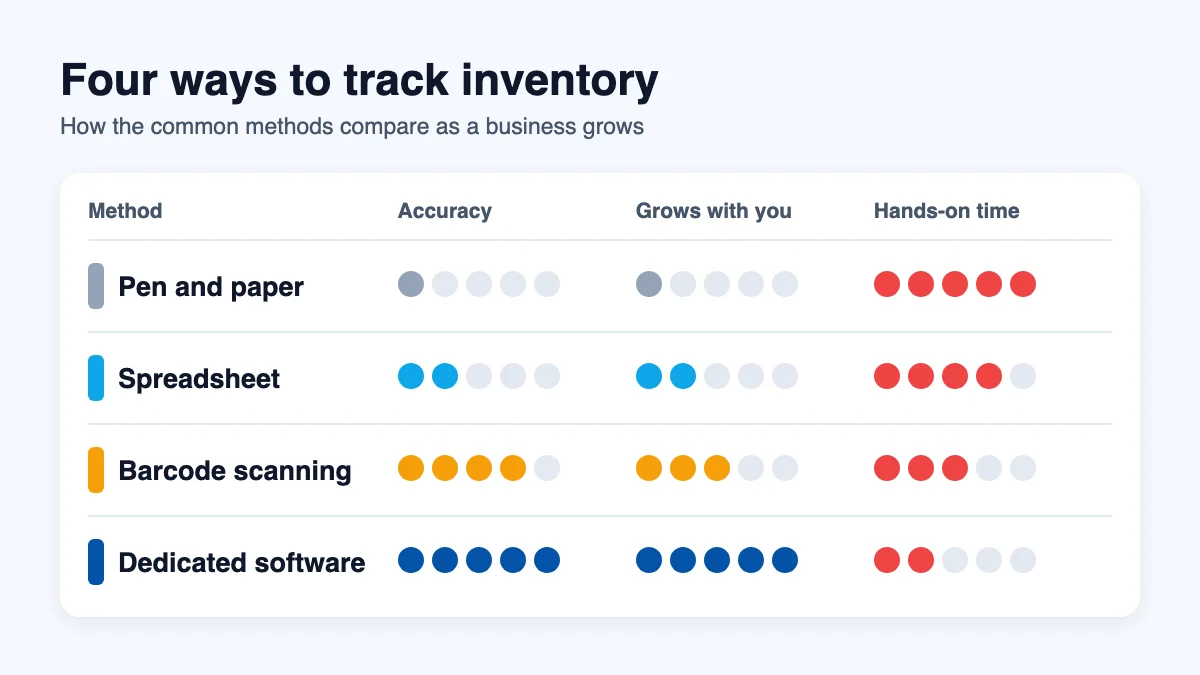
Once the habits are in place, the next question is how to track inventory day to day: on paper, in a spreadsheet, with a scanner, or with software. There is no single right tool. The method that suits you depends on how many products you carry, how many people handle them, and how many places you store them. Here is how the four common options compare.
Pen and Paper
A notebook or printed stock sheet costs almost nothing and needs no training. It works for very small businesses with a handful of products and one person in charge. The weakness is that paper cannot add up totals, warn you about low stock, or be read by anyone who is not standing next to it.
Spreadsheets
A spreadsheet adds formulas, sorting and simple charts, which makes it a natural next step. Many businesses run happily on one for years. Problems appear when several people edit the same file, when someone overwrites a formula, or when stock lives in more than one place. Version conflicts and typing errors become harder to spot as the file grows.
Barcode Labels and a Scanner
Scanning replaces typing with a quick beep, which removes most data entry mistakes and speeds up receiving and counting. Many modern tools let you scan with a phone camera, so you do not need special hardware to get started. Scanning works best when it feeds straight into a central record rather than into a separate file.
Dedicated Software
Purpose-built inventory tracking software combines all of the above. Every sale, delivery and transfer updates a single shared record, low-stock alerts arrive automatically, and you can see each location from any device. The setup takes a little longer than a spreadsheet, but it removes most of the manual work described in the steps above.
What Is the Best Way to Track Inventory for Your Business?
The best way to track inventory is the simplest method that still keeps your numbers accurate as you grow. Use this rough guide to decide.
- Under 50 products, one person, one room: paper or a basic spreadsheet is usually enough, as long as you record every movement the same day.
- 50 to 500 products or a small team: a spreadsheet with barcode labels works, but shared editing becomes risky. This is often the point where software starts to save time.
- Hundreds of products, several staff or more than one location: dedicated software is almost always the best way to track inventory, because manual methods cannot keep everyone looking at the same numbers.
Whatever you choose, the seven steps still apply. A tool only records what people tell it, so clear codes, a careful first count and same-day entries matter just as much with software as they do with paper.
How to Track Inventory When You Sell Online and In Store
Selling through more than one channel is where many stock records fall apart. A customer buys the last mug on your website at the same moment someone picks it up in your shop, and now you owe a refund and an apology. The problem is not the sale itself but the delay between the two records.
The fix is to keep a single stock figure for each item and have every channel draw from it. If you use a spreadsheet, that means updating it after every online order and every till sale, which quickly becomes a full-time job. This is the point where most owners discover that the best way to track inventory across channels is a shared system that updates the moment a sale happens anywhere. Until then, hold back a small number of units from your website so that in-store sales cannot oversell it.
How to Keep Track of Inventory Across More Than One Location
A second storeroom, a pop-up shop or a van that carries stock to customers adds a new challenge: items now move between places as well as in and out of the business. Each location needs its own count, and every transfer needs two entries, one to take stock out of the first place and one to put it into the second.
- Name every location clearly, even a single shelf in a garage, so nobody has to guess where an item lives.
- Record transfers as they happen, not at the end of the week, or stock will seem to vanish from one place and appear from nowhere in another.
- Count each location separately and compare the totals with your overall records each month.
Knowing how to keep track of inventory in one room is a good start, but multiple locations multiply every small error. This is usually where a shared, live record becomes essential rather than optional.
A Simple Daily Routine That Keeps Your Numbers Right
Good records come from small, repeated actions rather than occasional heroic efforts. A routine of fifteen minutes a day is enough for most small businesses, and it is the simplest answer to how to track inventory without falling behind.
- Morning: check the list of items that fell below their minimum yesterday and place any orders.
- During the day: log deliveries as you unpack them, and log returns before they go back on the shelf.
- Before closing: count one shelf or bin and compare it with your records.
- Once a week: write off damaged items and review anything that keeps coming up short.
Teams that follow a routine like this rarely face a stressful year-end count, because the numbers have been checked a little at a time all year long.
Common Mistakes That Throw Your Counts Off
Even careful teams make the same handful of errors. Watch out for these.
- Skipping returns: items that come back from customers often go straight onto the shelf without being logged.
- Trusting the invoice: always count deliveries against the packing slip before you sign. Short-shipments are common.
- Ignoring damaged goods: broken or expired stock should be written off the same day, not left in the count.
- Mixing up variations: sizes and colours that share one code make every count unreliable.
- Counting during busy hours: stock moves while you count, so totals never add up. Count before opening or after closing.
- Letting one person own everything: if only one employee understands the records, holidays and sick days leave you guessing.
Signs You Have Outgrown Manual Methods
Paper and spreadsheets serve many businesses well, and knowing how to keep track of inventory by hand is a useful skill. Still, there comes a point where they cost more time than they save. You have probably reached it if any of these sound familiar:
- You spend more than a few hours a week updating or fixing your stock file.
- Customers order items your records show as available, but the shelf is empty.
- Two people have edited the same spreadsheet and you are not sure which version is right.
- You store stock in more than one room, building or city.
- You only discover shortages when a customer complains.
If several of these apply, it is worth looking at real-time inventory tracking that updates automatically with every sale and delivery. InventorysHub lets you scan with a phone, set minimum levels for each item, and see stock across every location in one place, so the habits in this guide happen almost on their own.
Final Thoughts
Learning how to keep track of inventory comes down to consistency more than technology. Whether you choose paper, a spreadsheet or software, the best way to track inventory is the one your whole team will actually use every day. Give every item a clear code, count everything once, record each movement the same day, and check a few shelves every week. Those habits alone will make your numbers far more reliable.
When your business grows past what a notebook or spreadsheet can handle, move to a tool that does the recording for you. You can start a free InventorysHub account and bring your existing stock list across in minutes.
FAQs
Q. How often should I count my stock?
Ans: Do one full count when you start, then check small sections every week. Fast-selling and high-value items should be checked most often. A full count once or twice a year is still a good idea to confirm everything lines up.
Q. What is the best way to track inventory for a small shop?
Ans: For a small shop with one storeroom, a spreadsheet with barcode labels is often enough. List every product, give each one a short code, do one full count, and record every movement the same day. Those four steps work with paper, a spreadsheet or software.
Q. How to track inventory without software?
Ans: Use a spreadsheet with one row per item and columns for code, location, quantity and minimum level. Log every delivery, sale, return and write-off in a separate tab with the date and your initials.
Q. When should a small business switch to software?
Ans: Switch when you have more than a few hundred products, several people handling stock, or more than one storage location, or when fixing the spreadsheet takes hours each week.
Q. Can I use my phone to scan stock?
Ans: Yes. Many modern tools, including InventorysHub, let you scan barcodes with a phone camera, so you can start without buying a separate scanner.
For more stock tips and business updates, visit the official InventorysHub LinkedIn page.