 Michael
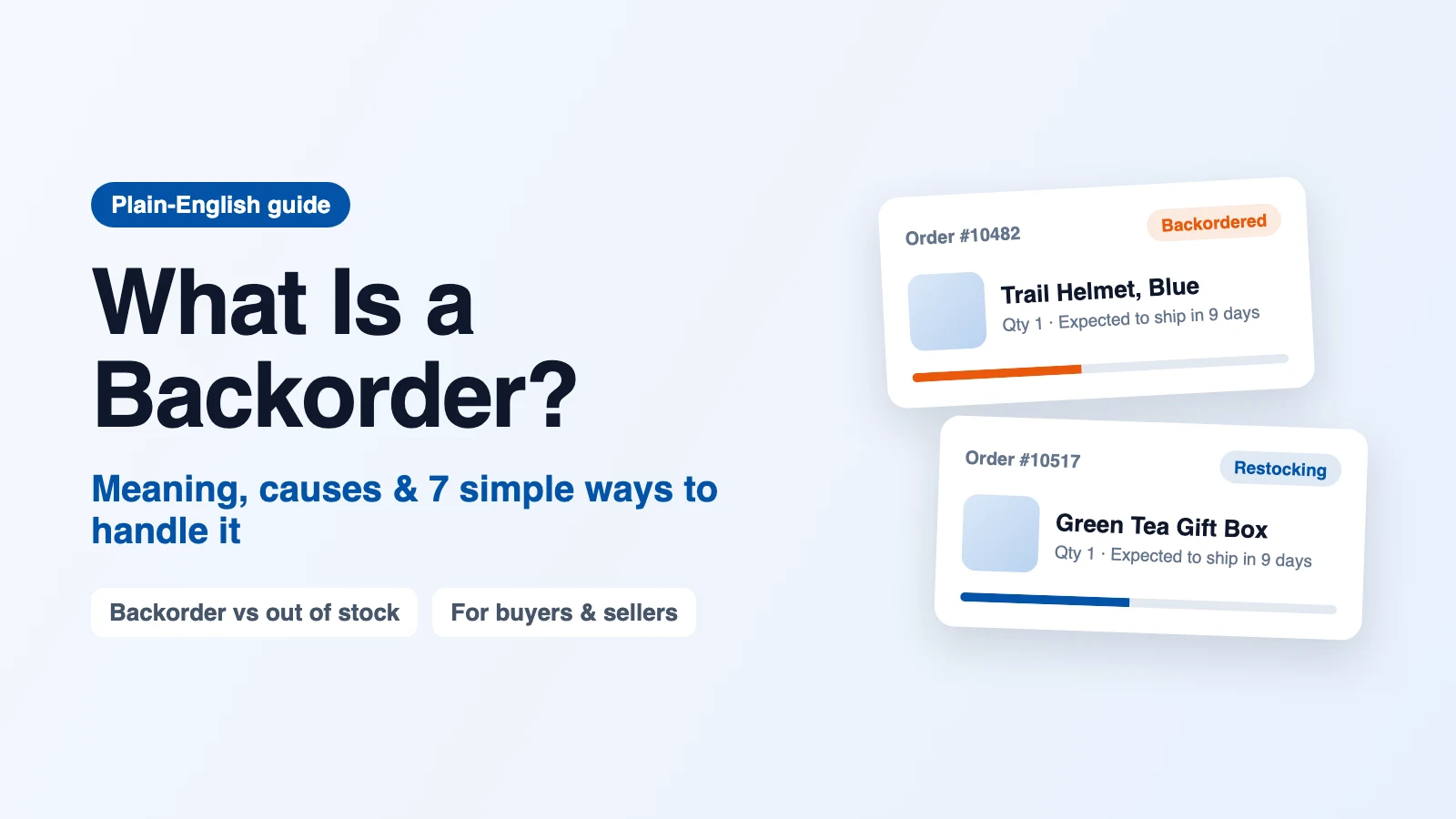
What is a backorder? A backorder is an order that a customer places for an item the seller does not have in stock right now, which the seller accepts anyway and ships as soon as new stock arrives from the supplier. The customer keeps their place in the queue, the business keeps the sale, and both simply wait a little longer than usual.
You have probably seen the word on a shopping website or in an email about something you bought. This guide explains the backorder meaning in plain language for both buyers and sellers. You will learn what does backordered mean on your own order, how a backorder differs from an item that is out of stock, why backorders happen in the first place, and seven practical ways a business can handle them without upsetting customers.
Backorder Meaning in Plain Language
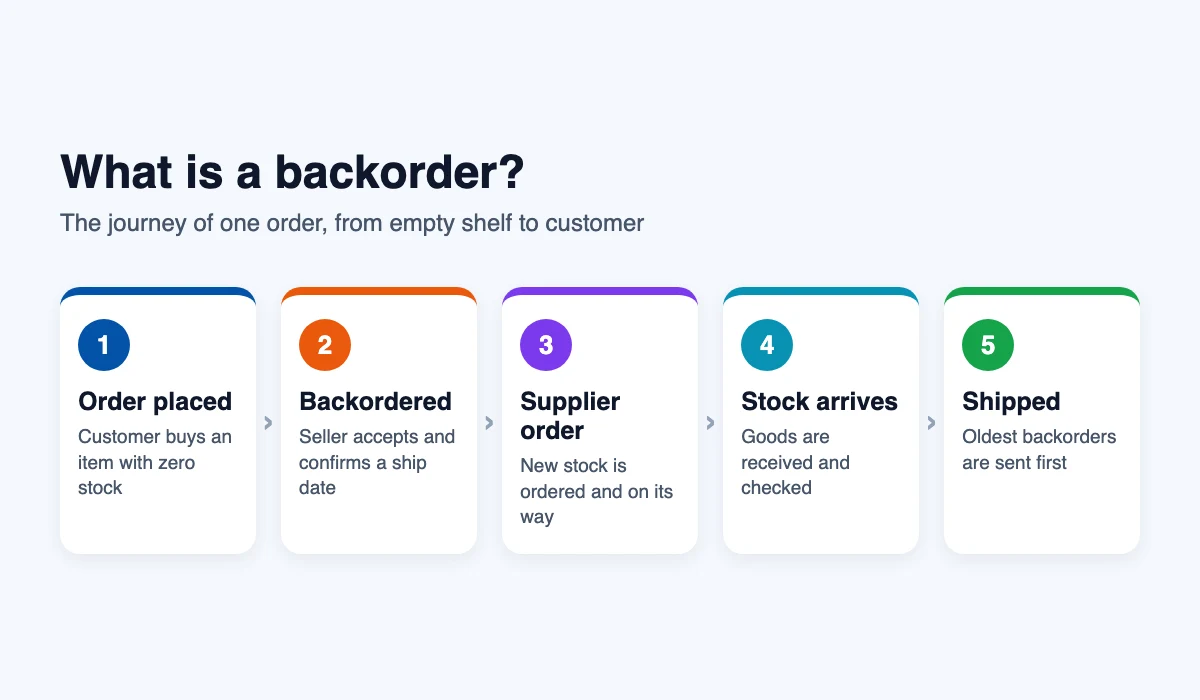
The backorder meaning is straightforward: a store says yes to an order even though the shelf is empty, places a new order with its supplier, and ships the item to the customer once the delivery arrives. Until then, the order waits in a queue. That is where the name comes from, because the order is placed “back” in line until it can be filled.
Some people write the term as two words, “back order”, and the back order meaning is exactly the same as the one-word version. Both spellings are correct and you will find both on websites and in customer emails. Businesses tend to use the single word, while shoppers searching for the back order meaning often type it as two separate words.
Here is a quick example. A local bike shop sells a popular helmet but has none left, although a new box of fifty is due next Thursday. A customer orders one today, and the shop accepts the order, explains that the helmet will ship next week, and sends it out the day the box arrives. That order was a backorder from start to finish.
What Does Backordered Mean on Your Order?
If you are a shopper, you may be wondering what does backordered mean for your purchase. In simple terms, the store has received and accepted your order, but it cannot ship that particular item yet. You are waiting in the queue, and when new stock comes in, your item will be packed and sent, usually in the same sequence in which people placed their orders.
Here is what normally happens after you see that status:
- You receive an expected date. A reliable store tells you roughly when the item should leave the warehouse.
- You may or may not be charged immediately. Some stores take payment at checkout, while others wait until the item actually ships.
- Other items may arrive first. If you bought several things, the rest of your order may come in a separate package.
- You can usually cancel. If the waiting period becomes too long, most sellers will cancel the order and refund you in full.
So when you see the word on your order, there is no need to worry. It is not an error or a sign that something went wrong. It simply means the store expects to receive more stock soon and has reserved your place in line until it does.
Backorder vs Out of Stock: What Is Different?
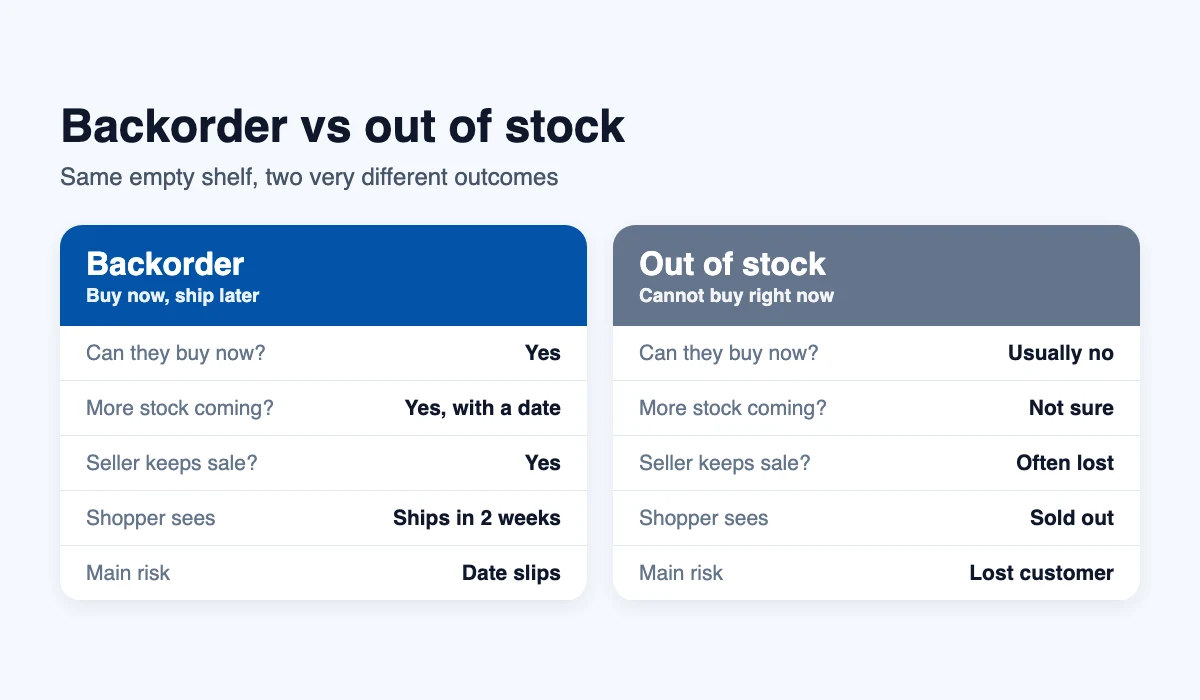
People often confuse these two terms, but they describe different situations. When an item is out of stock, you usually cannot buy it at all, because the button is disabled or replaced with a “notify me” option. When an item is on backorder, you can still purchase it immediately and then wait for it to ship. The backorder vs out of stock decision belongs to the seller, and it should depend on whether additional stock is genuinely on the way.
| Backorder | Out of stock | |
|---|---|---|
| Can the customer buy it now? | Yes | Usually no |
| Is more stock coming? | Yes, with an expected date | Maybe, maybe not |
| Does the seller keep the sale? | Yes | Often lost to another store |
| Is payment taken? | Sometimes now, sometimes at shipping | No |
| What the shopper sees | “Ships in 2 weeks” or “Backordered” | “Sold out” or “Notify me” |
| Main risk | Unhappy customer if the date slips | Lost sale and lost customer |
There is also a third option called a pre-order, which applies to a product that has never been sold before, such as a new book or game ahead of its release date. A backorder, by contrast, applies to a product you already sell but have temporarily run out of. Both arrangements mean “buy now, ship later”, but the reason behind the delay is completely different, which is why the back order meaning never covers brand-new products that have not launched yet.
Why Do Backorders Happen?
Backorders happen whenever customer demand is greater than the quantity sitting on the shelf. That gap can come from the customer side, the supplier side, or simply from a mistake in the stock records. These are the most common causes that small and growing businesses run into.
1. Demand Was Higher Than Expected
A product suddenly becomes popular on social media, a season starts earlier than usual, or a large customer places an unexpected order. Sales race ahead of the original plan, and the available stock disappears before the next delivery can arrive.
2. The Supplier Delivered Late
Suppliers face their own problems, including factory slowdowns, shipping containers held at ports, and shortages of raw materials. When their delivery arrives later than promised, every customer who ordered in the meantime has to wait as well.
3. The Reorder Was Placed Too Late
Sometimes the stock level was perfectly healthy, but nobody placed a new supplier order in time. If you wait until the last unit has sold before reordering, there will always be a gap while the replacement stock is still travelling to you.
4. The Stock Count Was Wrong
Your records might say you have ten units while the shelf actually holds two, because items were damaged, misplaced, or never recorded properly when they arrived. The website continues selling stock that does not really exist, and those orders quietly turn into backorders.
5. Seasonal or Bulk Demand
Certain products sell in large waves, such as heaters in winter or school bags in late summer. Even well-organised businesses can fall short at the very peak of a seasonal rush, especially when several large orders arrive on the same day.
Is a Backorder Good or Bad for a Business?
Knowing what is a backorder is only half the picture; the other half is deciding whether to allow them at all. A backorder is not automatically a bad thing. Handled carefully, it can rescue a sale that would otherwise have gone to a competitor. Handled poorly, it can cost you a loyal customer permanently. Here is a balanced look at both sides of the decision.
| Pros of allowing backorders | Cons of allowing backorders |
|---|---|
| You keep the sale instead of losing it | Customers may get tired of waiting |
| You learn which items are in high demand | More support emails and calls |
| You can order stock based on real orders | Refunds and cancellations if the date slips |
| Less cash tied up in extra stock | Harder to plan packing and shipping |
| Shows the item is popular, which can build trust | Bad reviews if you are not clear about the wait |
A sensible rule of thumb is to allow backorders only when you are confident about the date new stock will arrive. If you cannot be sure, it is usually kinder to display “out of stock” and let interested customers sign up for an alert when the product returns.
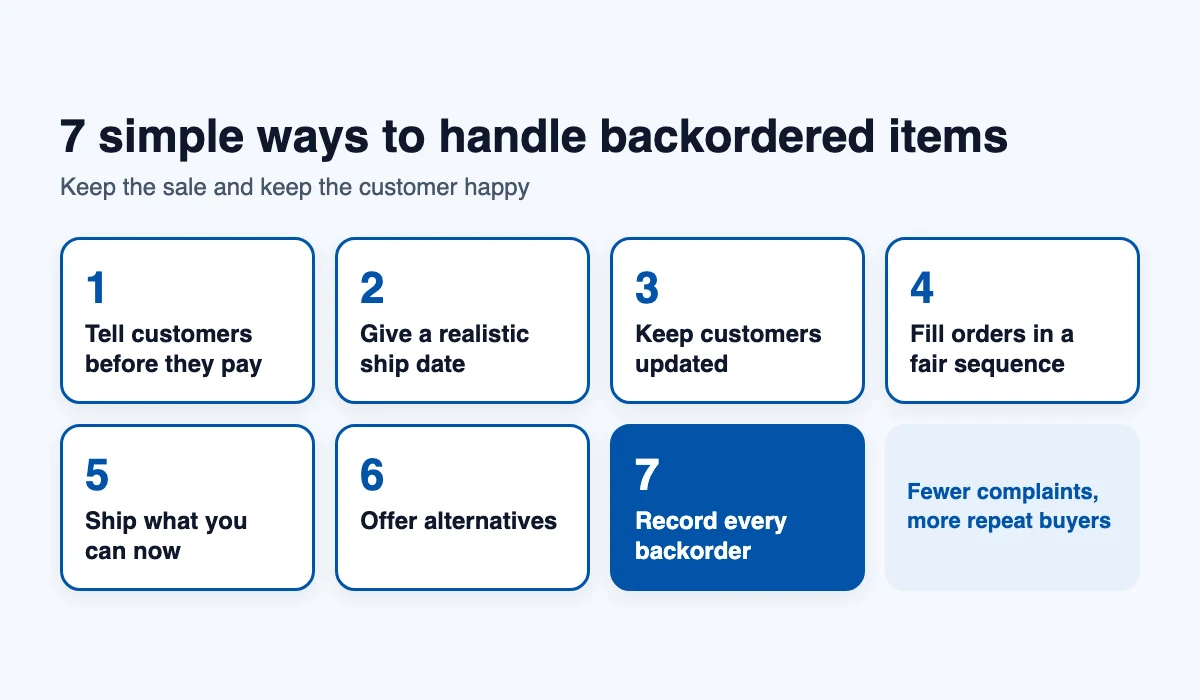
How to Handle Backordered Items: 7 Simple Ways
Once you understand what is a backorder and why it happens, the next step is handling it professionally. These seven steps keep customers informed, protect your reputation, and help your team stay organised when stock runs short.
1. Tell Customers Before They Pay
Display the word “backordered” or an expected shipping date on the product page and again at checkout. Customers are far more patient when they know about a delay in advance, while unexpected delays discovered after payment are what usually make them angry.
2. Give a Realistic Shipping Date
Ask your supplier for a confirmed delivery date and then add a few extra days as a buffer. Promising two weeks and delivering in ten days builds trust, whereas promising one week and delivering in two damages it.
3. Keep Customers Updated
Send a short email when the order is placed, another when stock is on its way, and a final one when the item ships. If the expected date changes, tell customers immediately and offer them a clear choice between waiting and cancelling. Many customers search what does backordered mean the moment they see the status, so one plain sentence in your email saves them the trouble.
4. Fill Orders in a Fair Sequence
When the new stock finally arrives, ship the oldest orders first. If there is not enough for everyone, decide in advance who receives priority, such as long-standing customers or orders that have already been paid in full.
5. Ship What You Can Now
If a customer ordered three items and only one of them is on backorder, send the other two straight away. A partial shipment demonstrates good faith and gets products into the customer’s hands much sooner.
6. Offer Alternatives
Give the customer several options: keep waiting, switch to a similar product, or cancel for a full refund. A small discount or free delivery on their next purchase can also turn a frustrating delay into a positive experience.
7. Record Every Backorder
Keep a list of every open backorder with the customer’s name, the item, the quantity, the order date and the promised shipping date. Reliable order management software maintains this list automatically and shows exactly which customer orders are waiting on which supplier delivery.
How to Prevent Backorders Before They Start
Handling backorders well is valuable, but having fewer of them is even better. These habits help you keep shelves stocked without tying up too much money in products that sit unsold.
- Set a reorder level for each item. Decide the stock level that should trigger a new supplier order. Our free reorder point calculator works it out from daily sales and supplier delivery times.
- Keep a small cushion for best sellers. A few extra units protect you when sales spike or a delivery is late. The safety stock calculator helps you find a sensible quantity.
- Know how long each supplier really takes. Record the actual time from order to delivery, not just the estimate on the quote.
- Count stock regularly. Short, frequent counts of fast-moving products catch gaps before the website sells stock you do not have.
- Study your sales patterns. Review last year’s busiest months and place orders early for the next peak period.
- Use more than one supplier. A backup supplier for important products means one late delivery does not halt your sales.
It also helps to measure how often you run short. Our guide to stockout rate shows a simple way to monitor it month by month and spot problem products early.
A Simple Backorder Example
Let us follow one situation from beginning to end. A small online tea shop sells a green tea gift box and usually sells around twenty boxes a week. Its supplier needs about ten days to deliver a fresh batch.
| Day | What happens | Stock on hand |
|---|---|---|
| Monday | A popular blog features the gift box. Sales jump to 15 in one day. | 12 → 0 |
| Monday | The shop orders 100 new boxes. The supplier confirms delivery in 10 days. | 0 |
| Tuesday | The site shows “Backordered, ships in about 2 weeks”. 18 more people buy. | 0 (18 backorders) |
| Tuesday | Each buyer receives an email with the expected shipping date. | 0 |
| Day 11 | 100 boxes arrive. The 18 backorders ship first, oldest order first. | 100 → 82 |
| Day 12 | Every customer receives a tracking number and a thank-you note. | 82 |
The shop kept all eighteen sales. Without backorders, those customers would have seen “sold out” and probably bought from another store. The two things that made it work were a confirmed supplier date and clear, timely emails.
Backorders for Online Stores and Marketplaces
Most online store platforms let you switch backorders on or off for each individual product. When the setting is on, customers can keep buying after the stock count reaches zero. When it is off, the product simply shows as sold out. Some marketplaces apply stricter rules, limiting how long a listing can remain on backorder or lowering your seller rating when orders ship late.
Before you allow backorders online, check three things. First, make sure the product page clearly shows the expected shipping date. Second, confirm that your stock count is accurate, so you do not oversell. Third, make sure your store policy explains when payment is taken and how customers can cancel. In practice, this setting is the backorder vs out of stock decision made one product at a time.
Common Backorder Mistakes to Avoid
- Hiding the delay. Customers discover the wait after paying and feel misled.
- Guessing the date. An optimistic guess that slips twice does more damage than an honest, longer estimate.
- Going silent. Without updates, customers assume their order has been lost.
- Accepting far more than is coming. If fifty boxes are due, do not accept two hundred backorders.
- Forgetting older orders. When new stock arrives, open backorders must ship before any new sales.
- Keeping no records. Without a proper list, it is easy to miss a customer or ship the same order twice.
How Backorders Connect to Your Daily Work
Backorders affect almost every part of a small business. The sales team takes the order, the buyer places the supplier order, the stockroom receives the goods, the packing team ships the oldest orders first, and customer service answers questions along the way. When each of these steps lives in a different notebook or spreadsheet, backorders easily slip through the gaps. It also helps when every member of staff understands the backorder meaning in the same way and gives customers the same answer.
That is why many growing businesses move everything into one system. When an order arrives for a product with no stock, the system can flag it as a backorder, link it to the next supplier delivery, and alert you as soon as the goods arrive. InventorysHub order management keeps sales orders, supplier orders and stock counts together, so every backorder has an owner and a date. You can start a free account and test it with your own products.
Final Thoughts
So, what is a backorder? At heart, it is a promise: the customer agrees to wait, and the business agrees to deliver as soon as possible. When that promise is clear and kept, a backorder protects the sale and can even strengthen trust. When it is vague or broken, it can lose a customer for good.
For shoppers, the backorder meaning is reassuring, because your order is safe and will ship when fresh stock arrives. For businesses, the lesson is equally simple: be honest about the wait, keep people updated, ship the oldest orders first, and build good reordering habits so that backorders stay rare. You can read more about the term on Wikipedia’s backorder page.
FAQs
Q. What is a backorder in simple words?
Ans: A backorder is an order a customer has placed and paid for, or promised to pay for, while the item is out of stock. The seller accepts the order now and ships it as soon as new stock arrives.
Q. What does backordered mean on my order?
Ans: It means the store has accepted your order, but the item is not on the shelf yet. The seller is waiting for a new delivery and will ship your item when it comes in. You usually keep your place in the queue.
Q. Is backorder the same as out of stock?
Ans: No. Out of stock means you cannot buy the item right now. Backorder means you can still buy it, and it will ship later when new stock arrives. In the backorder vs out of stock choice, the seller decides which one to show.
Q. How long does a backorder usually take?
Ans: It depends on the supplier. Many backorders clear in one to three weeks, but special or imported items can take longer. A good seller gives you an expected ship date and updates you if it changes.
Q. Will I be charged for a backordered item?
Ans: Some sellers charge when you order, and others charge only when the item ships. Check the store’s policy. If the wait gets too long, most sellers let you cancel for a full refund.
Q. How can a business reduce backorders?
Ans: Set clear reorder levels, keep a small cushion of extra stock for best sellers, agree firm delivery dates with suppliers, and check stock levels often so you reorder before you run out.
For more stock tips and business updates, visit the official InventorysHub LinkedIn page.