 Michael
What is inventory management technology? It is the set of tools a business uses to count its stock, record every movement, and decide when to reorder. The most common examples are barcode scanners, RFID tags, phone apps, cloud-based systems, automatic reorder alerts, sales forecasts and shelf sensors. Together, they replace paper lists and guesswork with counts you can trust.
Each of the seven tools is explained below in plain words, along with how inventory management technology fits into an ordinary working day, what each tool costs, and which ones suit a small shop or a busy warehouse. We also cover the benefits of inventory management system tools, compare them with spreadsheets, and share a simple plan for choosing and setting them up.
How Inventory Management Technology Works
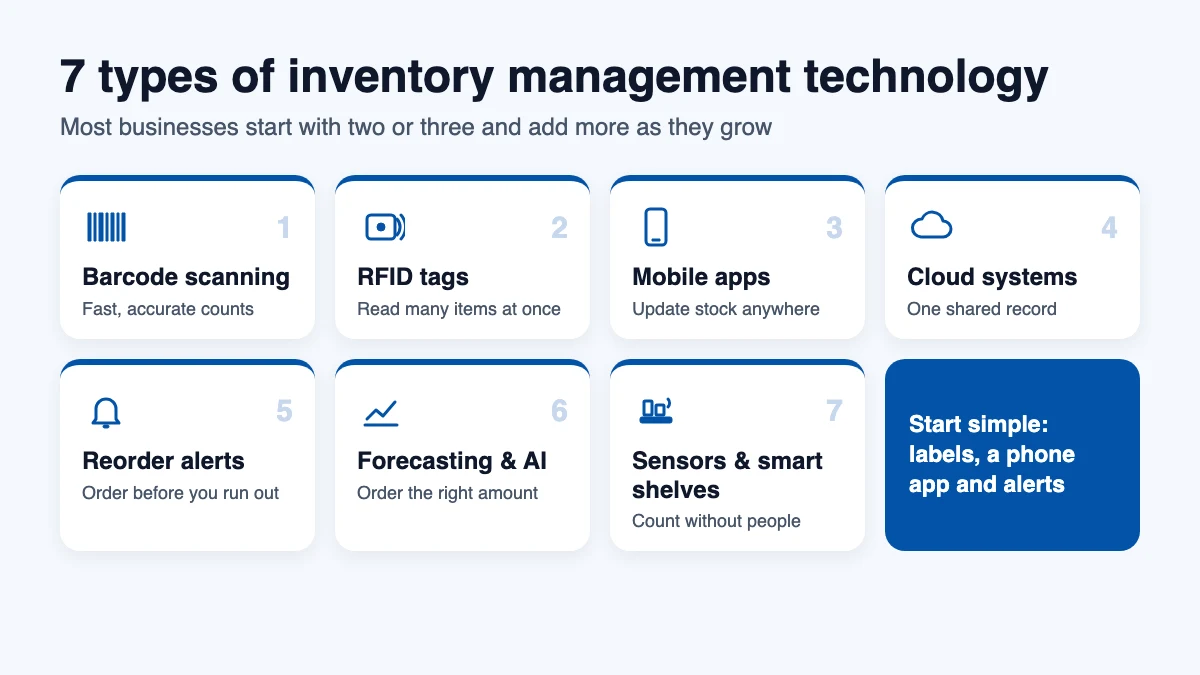
Every piece of inventory management technology follows the same basic loop. First, an item is identified, usually by scanning a label. Next, the system records what happened, whether a delivery came in, an order went out, or a box moved to a new shelf, and the count then updates for everyone at once.
Once the numbers are right, the system can do useful work on its own. It can warn you when an item is running low, suggest how many to reorder, and show which products sell fastest. The table below shows this loop in a small shop that sells coffee beans.
| Step | What happens | Example |
|---|---|---|
| 1. Identify | A label is scanned or a tag is read | A bag of house blend is scanned at the till |
| 2. Record | The sale, delivery or move is saved | One bag is taken off the shelf count |
| 3. Update | Counts change for every user and device | The shop owner sees 11 bags left on their phone |
| 4. Alert | Low items are flagged before they run out | An alert appears when stock falls to 10 bags |
| 5. Reorder | A new order is drafted with the right amount | A supplier order for 40 bags is ready to send |
| 6. Report | Trends show what sells and what sits | House blend sells twice as fast in winter |
The rest of this guide looks at the seven tools that power this loop, starting with the simplest.
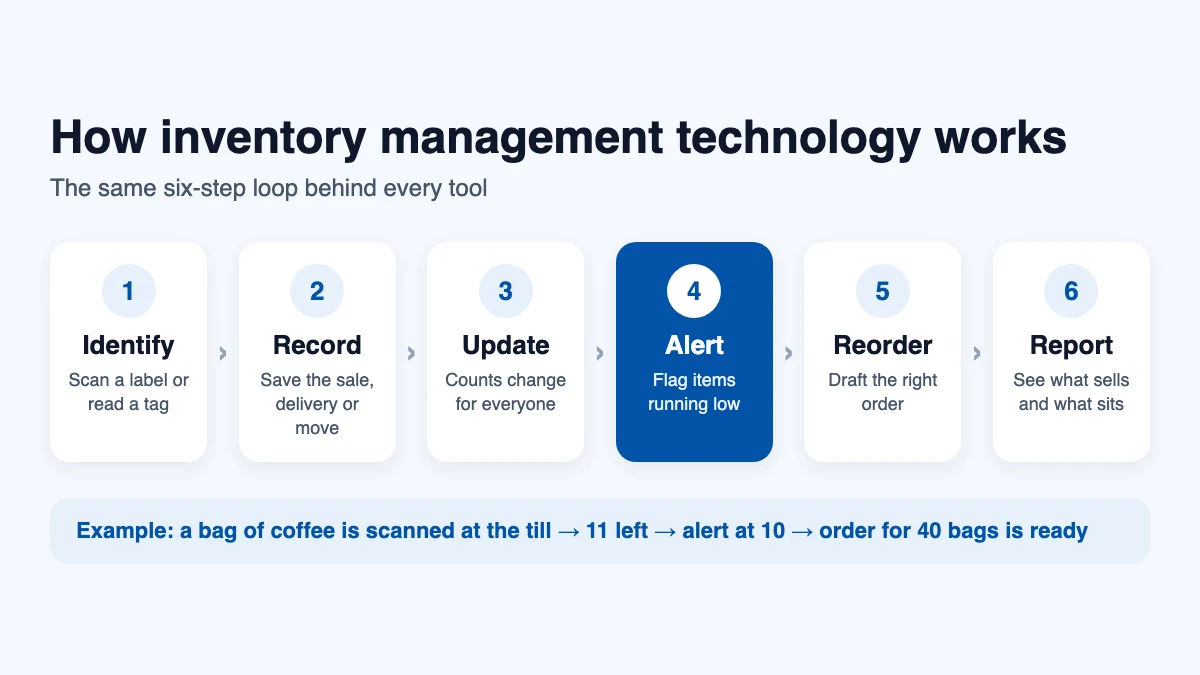
The 7 Types of Inventory Management Technology
1. Barcode Scanning
A barcode is a code printed as lines that a scanner can read in under a second. You print a label for each product, stick it on the item or the shelf, and scan it whenever stock arrives, moves or leaves. Because scanning removes most typing mistakes, which are the biggest single source of wrong counts, it is the first piece of inventory management technology most businesses adopt.
You do not need special hardware to start. Most phone cameras can read barcodes, and label printers are cheap. The global standards for product barcodes are managed by GS1, but you can also print your own codes for items that do not carry one.
2. RFID Tags and Readers
RFID stands for radio-frequency identification. Each item gets a small tag with a chip and an antenna. A reader picks up the tag by radio, so it does not need to see a label. One reader can scan dozens of tags at once, even inside a closed box.
RFID is fast, but it costs more than barcodes. Tags cost a few cents each, and readers can cost hundreds of dollars. It suits businesses that count large volumes, such as clothing retailers and distribution centres. You can read more about how the technology works on Wikipedia’s RFID page.
3. Mobile Apps
A phone or tablet app lets staff check counts, scan items and receive deliveries wherever they are standing. They no longer need to walk back to a desk to update a record. For field teams, this also means a van or a job site can stay in sync with the main stockroom.
Good apps work on the phones your team already owns, which keeps the starting cost close to zero. Look for one that scans with the camera, shows photos of each product, and keeps working for a short time if the signal drops in a basement or a remote job site.
4. Cloud-Based Systems
A cloud-based system stores your stock records online instead of on one office computer. Everyone sees the same numbers, whether they are in the shop, the warehouse or at home. Updates appear within seconds, and the provider handles backups and security.
This matters most when more than one person handles stock. With a shared online record, two people can no longer sell the last item twice, and the owner can check counts from anywhere without calling the team or waiting for an end-of-day report.
5. Automatic Reorder Alerts
A reorder alert is a simple rule: when an item falls to a set level, the system tells you. That level is called the reorder point. It is based on how fast the item sells and how long your supplier takes to deliver. Our free reorder point calculator can work this number out for you.
Some systems go one step further and draft the supplier order for you. You check the amount, press send, and the order is on its way. This keeps busy owners from forgetting to reorder until a shelf is already empty.
6. Sales Forecasting and AI
Forecasting tools look at past sales to predict future demand. They notice patterns that people miss, such as a product that sells more on hot days or in the weeks before a holiday. Newer tools use AI to weigh many signals at once, including season, promotions and local events.
Forecasts help you order the right amount at the right time, so you avoid tying up cash in stock that will sit for months and you avoid running out during a seasonal rush. Our knowledge center explains the basics of how demand forecasts are made in more detail.
7. Sensors and Smart Shelves
Sensors measure stock without anyone counting it. A weight sensor under a shelf knows how many items sit on it. A level sensor in a tank knows how much liquid is left. When the amount drops, the sensor sends the update to your system on its own.
This kind of inventory management technology is still more common in large sites, such as factories, hospitals and fuel depots. Prices are falling, though, and small businesses are starting to use sensors for high-value items or bulk supplies.
Comparing the 7 Tools at a Glance
Each type of inventory management technology solves a different problem, so it helps to see them side by side. The table below sums up what each one does best, what it costs to start, and who it suits.
| Tool | Best at | Starting cost | Good fit for |
|---|---|---|---|
| Barcode scanning | Fast, accurate counts with few typing errors | Low | Almost every business |
| RFID tags | Reading many items at once without line of sight | Medium to high | High-volume retail and distribution |
| Mobile apps | Updating stock from anywhere | Low | Field teams and small shops |
| Cloud systems | One shared, up-to-date record | Low to medium | Any team with more than one user |
| Reorder alerts | Ordering before items run out | Usually included | Anyone who has run out of a bestseller |
| Forecasting and AI | Ordering the right amount for the season | Medium | Seasonal or fast-growing businesses |
| Sensors and smart shelves | Counting without people | High | Factories, hospitals and bulk supplies |
Benefits of Inventory Management System Tools
Why do businesses invest in these tools at all? The benefits of inventory management system tools show up in time, money and calmer days. Here are the gains owners report most often.
- Accurate counts: scanning and instant updates keep the numbers on screen close to what is really on the shelf.
- Fewer stockouts: alerts warn you before a bestseller runs out, so you do not lose sales or disappoint customers.
- Less cash tied up: clear sales data stops you from over-ordering items that sell slowly.
- Less time counting: scanning a shelf takes minutes, while counting by hand can take a whole afternoon.
- Faster supplier orders: the system suggests what to order, so purchasing takes minutes instead of hours.
- Clear reports: you can see which items earn the most and which ones only take up space.
- Better teamwork: everyone works from the same record, so fewer mistakes slip between staff and shifts.
Accuracy is the gain that makes all the others possible. If you want to see how small counting errors grow into lost sales and wasted cash, our knowledge center explains why accurate counts matter.
A Real Example: A Small Hardware Store
Picture a hardware store with 2,000 products and four staff. Before using any tools, the owner counted stock by hand once a month and reordered from memory. Popular screws ran out every few weeks, while slow-selling paint filled the back room.
This is what the benefits of inventory management software look like in practice. After switching to barcode labels, a shared cloud record and reorder alerts, the monthly count dropped from two days to three hours. Stockouts of top items almost stopped. The owner also spotted $4,000 of paint that had not sold in a year, cleared it with a sale, and used the cash to stock more of what customers actually wanted.
Advantages of Inventory Management Software Over Spreadsheets
Many businesses start with a spreadsheet, and that is a sensible first step. It is free, flexible and familiar. The problems appear as you grow: more products, more staff, more places to keep stock. The advantages of inventory management software become clear once a spreadsheet starts slowing you down.
| Spreadsheet | Dedicated software | |
|---|---|---|
| Updating counts | Typed in by hand, often at the end of the day | Updated the moment an item is scanned |
| Several users | Edits clash and versions get mixed up | Everyone works on the same live record |
| Low stock warnings | Only if someone checks | Automatic alerts at the level you set |
| Barcode scanning | Not built in | Built in, often with a phone camera |
| History of changes | Hard to trace who changed what | Every change is logged with a name and time |
| Reports | Built by hand with formulas | Ready-made reports in a few clicks |
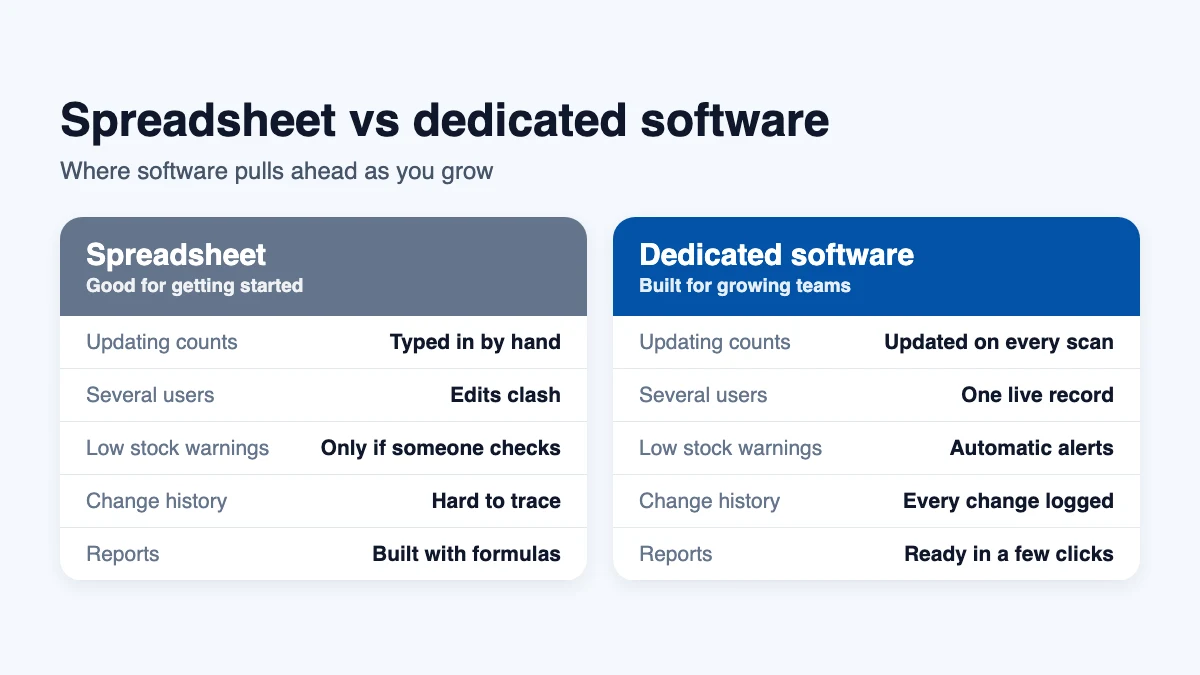
None of this means spreadsheets are bad; they are simply built for a different job. The benefits of inventory management software grow with every product and every person you add, so when you spend more time fixing the sheet than using it, that is usually the sign to move on.
How to Choose the Right Tools
You do not need every kind of inventory management technology at once. Most businesses start with two or three tools and add more as they grow, and the questions below will help you decide where to begin.
- How many products do you hold? A few hundred items can run well on barcodes and a phone app. Tens of thousands may justify RFID.
- How many people touch stock? If more than one person sells, receives or moves items, a shared cloud record is essential.
- Where is your stock kept? Several shops, vans or storerooms need tools that keep every site in sync.
- What does a mistake cost you? Expensive, perishable or regulated goods justify more automation than cheap, simple ones.
- What can your team learn quickly? The best tool is the one your staff will actually use every day.
When you compare products, write down the three problems that cost you the most today. Then test each option against those problems, not against a long list of extras you may never need.
How to Introduce New Tools in 5 Steps
A smooth start matters more than the tool itself. Follow these steps to bring inventory management technology into your business without disrupting daily work.
- Clean up your product list. Remove duplicates, fix names, and give every item a short, unique code.
- Do a full count. Start with accurate numbers, or the new system will only spread old mistakes faster.
- Label everything. Print barcode labels for products and shelves, starting with your fastest sellers.
- Set reorder levels. Choose a minimum for each key item, based on sales speed and supplier delivery time.
- Train the team and review weekly. Show staff the daily routine, then check the numbers each week for the first month.
Common Mistakes to Avoid
- Buying more than you need: complex tools with features nobody uses only slow your team down.
- Skipping the first count: new tools cannot fix numbers that were wrong from day one.
- Labelling only some items: half-labelled stock leads to half-accurate counts.
- Ignoring alerts: warnings only help if someone is responsible for acting on them.
- Forgetting to train new staff: every new person needs the same simple routine on their first day.
Where This Technology Is Heading
The next few years will bring smarter forecasts, cheaper sensors and more automation. AI tools are getting better at reading sales patterns and suggesting orders. RFID tags keep getting cheaper. More suppliers can now receive orders straight from your system.
For growing businesses, the lesson is simple: start with the basics that solve today’s problems, and choose inventory management technology that can grow with you. A clean product list and accurate counts will make every future upgrade easier, cheaper and quicker to roll out.
Putting It All Together
The real benefits of inventory management software come from combining a few tools well. Barcode labels feed accurate counts into a shared cloud record. Alerts warn you before items run out. Reports show where your cash is going. Each tool makes the next one more useful.
InventorysHub brings these together in one place. You can scan with a phone camera, see counts across every location, and get alerts before stock runs low. Browse our inventory management tools to see how each part works, or compare all the inventory management features side by side. You can also start a free account and add your first products in minutes.
Final Thoughts
Inventory management technology is not only for big companies anymore. Barcode scanning, phone apps, cloud records and reorder alerts are affordable for almost any business. RFID, forecasting and sensors are within reach as you grow.
Start with the problems that cost you the most today. Pick two or three tools that solve them, clean up your product list, and do one accurate count. The benefits of inventory management system tools build from there: fewer stockouts, less wasted cash, and far less time spent counting by hand.
FAQs
Q. What is inventory management technology in simple words?
Ans: It is the set of tools a business uses to count, record and reorder its stock. It covers barcode scanners, RFID tags, phone apps, cloud systems, reorder alerts, sales forecasts and shelf sensors.
Q. What are the main benefits of inventory management system tools?
Ans: The main benefits are accurate counts, fewer stockouts, less cash tied up in extra stock, faster ordering, less time spent counting by hand, and clear reports for better decisions.
Q. Is barcode scanning or RFID better for a small business?
Ans: Barcode scanning is usually the better start. Labels cost very little and any phone can scan them. RFID makes sense later, when you count thousands of items or need to read many tags at once.
Q. What are the advantages of inventory management software over a spreadsheet?
Ans: Software updates counts the moment stock moves, lets several people work at once, warns you before items run out, and keeps a history of every change. A spreadsheet needs manual updates and breaks easily when many people edit it.
Q. How much does this kind of technology cost?
Ans: Costs vary widely. Barcode labels and a phone app can start free or at a low monthly fee. RFID tags, fixed readers and shelf sensors cost more, so most small teams add them only when the volume justifies it.
Q. How long does it take to set up?
Ans: A small business can usually set up products, labels and reorder levels in a few days. Larger teams with several sites or thousands of items may need two to four weeks, including a full first count and staff training.
For more stock tips and business updates, visit the official InventorysHub LinkedIn page.