Before you start
- Sign in as the workspace owner or an Admin.
- Agree on the formats with your team first, because these settings apply to everyone.
How to change InventorysHub system settings
-
Open System Settings
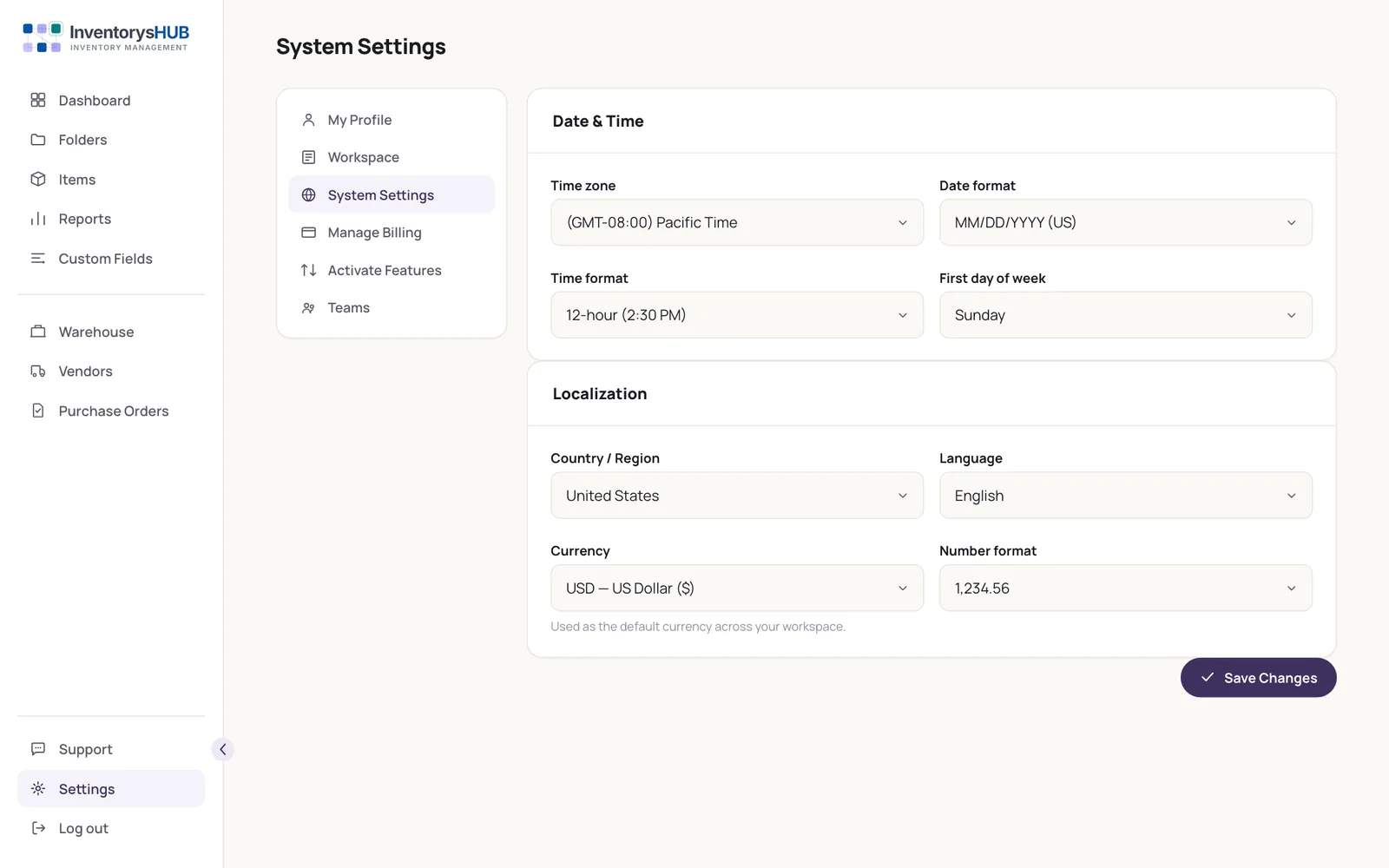
Click Settings in the left menu, then click System Settings. The page has two sections: Date & Time and Localization.
-
Set the date and time options
- Time zone sets the workspace’s home time zone.
- Date format lets you choose MM/DD/YYYY, DD/MM/YYYY, DD.MM.YYYY or the ISO style YYYY-MM-DD.
- Time format switches between a 12-hour clock and a 24-hour clock.
- First day of week picks Sunday or Monday for weekly views.
-
Set the localization options
- Country / Region sets your main market.
- Language records the language your team prefers.
- Currency sets the money symbol for unit costs, stock value and reports.
- Number format chooses how thousands and decimals are written: 1,234.56, 1.234,56 or 1 234,56.
Pick the currency you buy stock in. Changing it later changes the symbol, not the numbers, so values are not converted.
-
Save your changes
Click Save Changes. The new formats apply across the workspace the next time each page loads.
System settings or profile settings?
InventorysHub system settings are shared by the whole workspace. Your own Time zone in My Profile is personal. If your team works across time zones, set the workspace time zone to your main site, and let each person set their own in their profile.
Good choices for common setups
| Business in | Date | Time | Currency | Numbers |
|---|---|---|---|---|
| United States | MM/DD/YYYY | 12-hour | USD | 1,234.56 |
| United Kingdom | DD/MM/YYYY | 24-hour | GBP | 1,234.56 |
| India | DD/MM/YYYY | 12-hour | INR | 1,234.56 |
| Germany | DD.MM.YYYY | 24-hour | EUR | 1.234,56 |
These are only common examples. Pick whatever your team finds easiest to read.
Why it matters to change InventorysHub system settings early
Setting formats on day one avoids confusion later, especially in exports that you share with an accountant. Clear dates and money values make every report easier to trust. Because your data is online, everyone sees the same formats on every device, one of the perks of our cloud inventory software.
Quick answers
Will changing the currency convert my values?
No. Only the symbol changes. If you switch currency, update unit costs on your items by hand.
Who can change InventorysHub system settings?
The workspace owner and Admins. Members can see the page but cannot save changes.
Do system settings change past records?
No numbers are changed. Dates and amounts in existing items and history simply show in the new format the next time you open them.
I picked the wrong currency during setup. How do I fix it?
Choose the right one under Localization and click Save Changes.