Before you start
- Sign in as the workspace owner. Only the owner can manage billing.
- Have a debit or credit card ready. Payments are handled securely by Stripe.
- Check current prices on our InventorysHub pricing page.
How to choose an InventorysHub plan
-
Open the plans
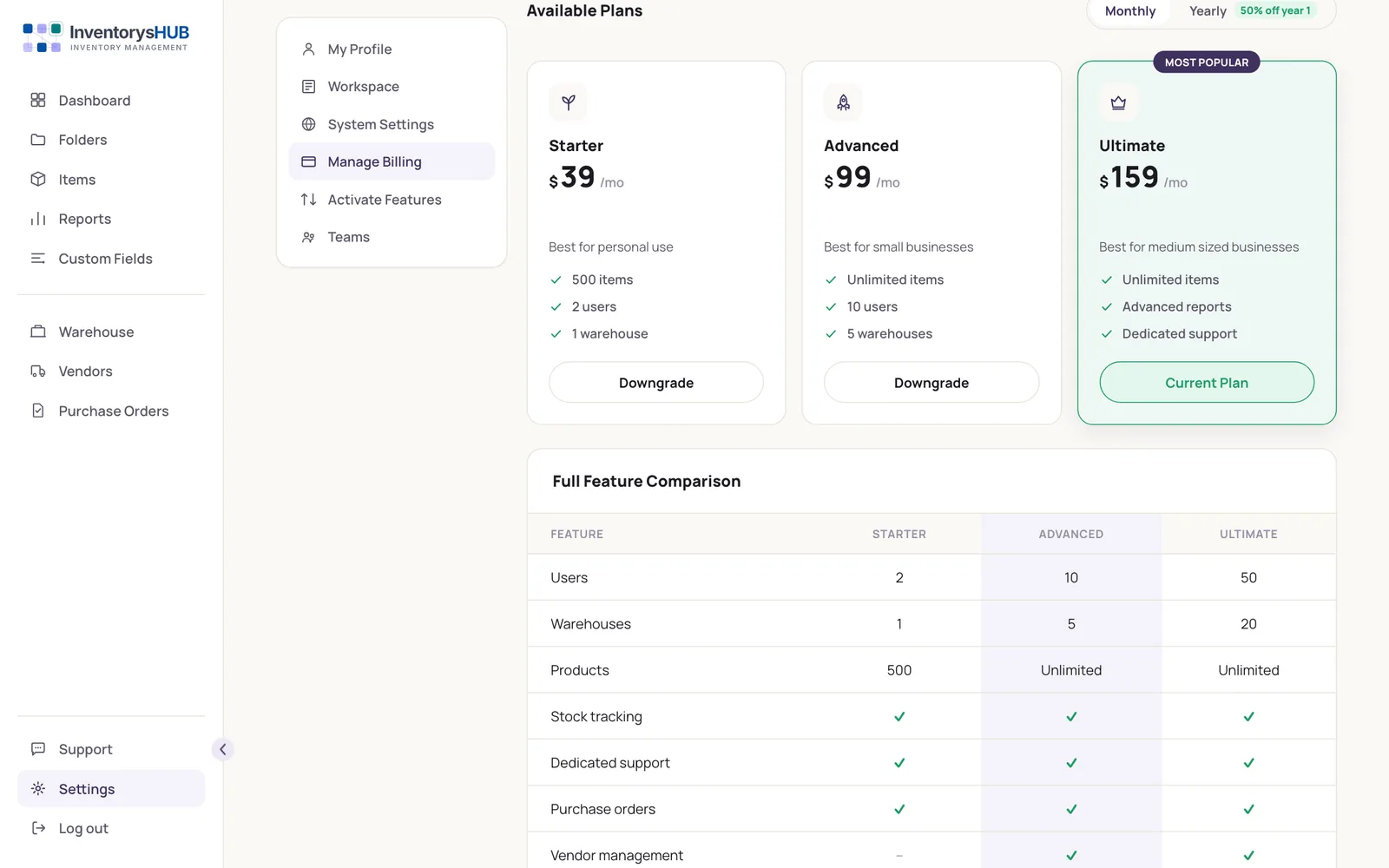
Click Settings, then Manage Billing, and scroll to Available Plans. If you try a locked feature, such as Reports, the app also offers to take you to the plan page.
-
Pick monthly or yearly billing
Use the switch at the top to choose Monthly or Yearly. Yearly billing shows the first-year discount on each card, so compare both before you decide.
-
Compare and choose a plan
Read the cards for Starter, Advanced and Ultimate, and scroll to Full Feature Comparison for every detail. Click the button on the plan you want.
-
Pay and activate
A secure checkout window opens. Enter your card number, expiry and CVC, then your billing name and address. Check the Amount due and click Pay & Activate. Your new plan starts as soon as the payment is confirmed.
Your card details go straight to Stripe. InventorysHub never stores your full card number.
What each plan includes
| Free | Starter | Advanced | Ultimate | |
|---|---|---|---|---|
| Items | 50 | 500 | No limit | No limit |
| Folders | 3 | No limit | No limit | No limit |
| Warehouses | 1 | 1 | 5 | 20 |
| Users | 2 | 2 | 10 | 50 |
| Purchase orders | Yes | Yes | Yes, with vendors | Yes, with vendors |
| Barcodes and stock transfers | No | No | Yes | Yes |
| Custom fields and reports | No | No | No | Yes |
Which plan is right for me?
- Free: trying the app, or a small personal list.
- Starter: a small shop with one location and up to 500 items.
- Advanced: a growing team with several sites, barcodes and suppliers on orders.
- Ultimate: teams that need reports, exports and custom fields, or many locations and users.
Not sure yet? Stay on our free inventory management software plan and upgrade when you hit a limit. You can choose an InventorysHub plan at any time without losing data.
Quick answers
Can I choose an InventorysHub plan and switch later?
Yes. You can move up or down at any time. See how to change your plan.
Is my payment safe?
Yes. Payments are processed by Stripe, a leading payment company, over an encrypted connection.
Do I get an invoice?
Yes. Every payment appears in Billing History, where you can download it. See card and invoices.
What happens if I stay on the free plan?
Nothing changes. You can keep using the free plan for as long as you like, within its limits on items, folders, warehouses and users.