Before you start
- Custom fields are part of the Ultimate plan.
- Let your team know before you archive a field, since it will vanish from their item forms.
- Check how many items use the field. The count is shown under its name.
How to archive a custom field in InventorysHub
-
Open Custom Fields
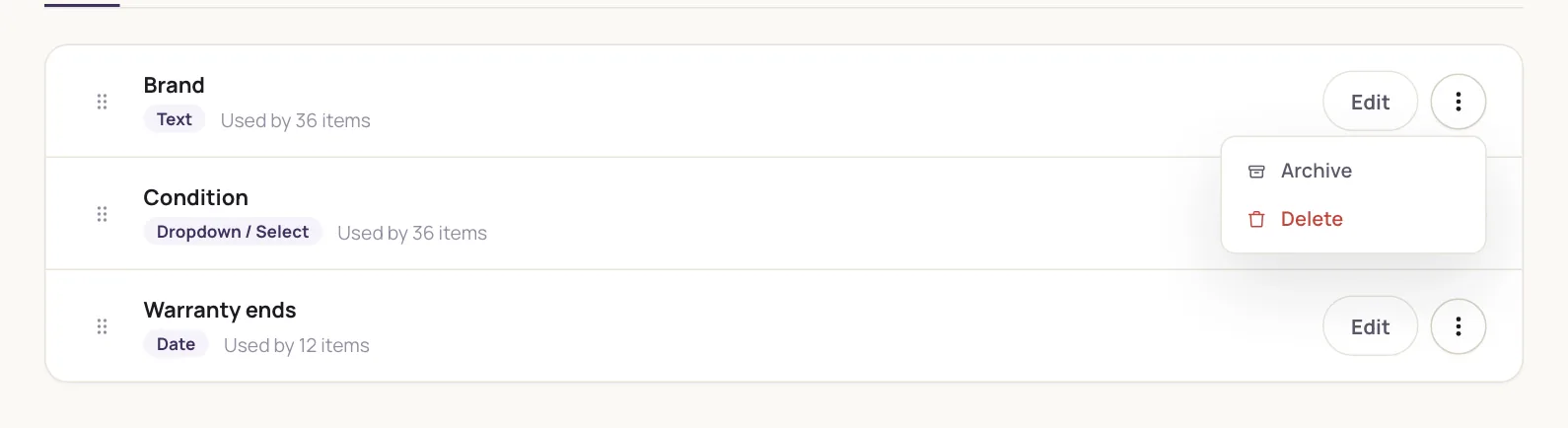
Click Custom Fields in the left menu. Each field on the Active tab shows its type and a line such as “Used by 12 items”.
-
Open the field menu
Click the ⋮ button on the right of the field. The menu offers Archive and Delete. The Edit button next to it lets you rename the field instead.
-
Click Archive
Click Archive. The field moves to the Archived tab and no longer appears on item forms. Every value you saved stays stored, so nothing is lost.
Archive is the safe choice when you are not sure. You can always undo it later.
Bring an archived field back
Open the Archived tab and click Unarchive next to the field. It returns to the Active list and to item forms, with its old values still in place.
Delete a field for good
Choose Delete from the field menu only when you are certain. The app warns that deleting removes the field from item forms and permanently removes every value stored in it. Click Delete Field to confirm. This cannot be undone, so archive the field first if you might ever need those values again.
Archive or delete: which should I pick?
| Archive | Delete | |
|---|---|---|
| Hidden from item forms | Yes | Yes |
| Saved values kept | Yes | No, removed for good |
| Can be undone | Yes, with Unarchive | No |
| Best for | Seasonal or old details | Fields made by mistake |
Keep your item forms tidy
When you archive a custom field in InventorysHub, your forms get shorter and faster to fill in. Review your fields every few months and archive the ones nobody uses. You can also drag active fields to put the most used ones first. For more ideas, visit our custom field builder page or read how to add custom fields.
Quick answers
Does it delete data when I archive a custom field in InventorysHub?
No. Archiving hides the field but keeps every value. Only Delete removes the values.
Can I edit an archived field?
Unarchive it first, make your changes, and archive it again if you still want it hidden.
What happens to a required field when I archive it?
Once archived, the field is no longer on item forms, so it is no longer asked for when people add or edit items.